DTCC Tokenization Service: Create a Conversion Order
The Tokenization Service enables creation of a tokenized representation of an equity, treasury security, or other assets (as applicable).
Assets can exist in one of two forms: tokenized or traditional. A conversion order transforms an asset from one form to the other—either from traditional to tokenized form or from tokenized to traditional form.
|
Key Concepts |
|
To create a Conversion Order:
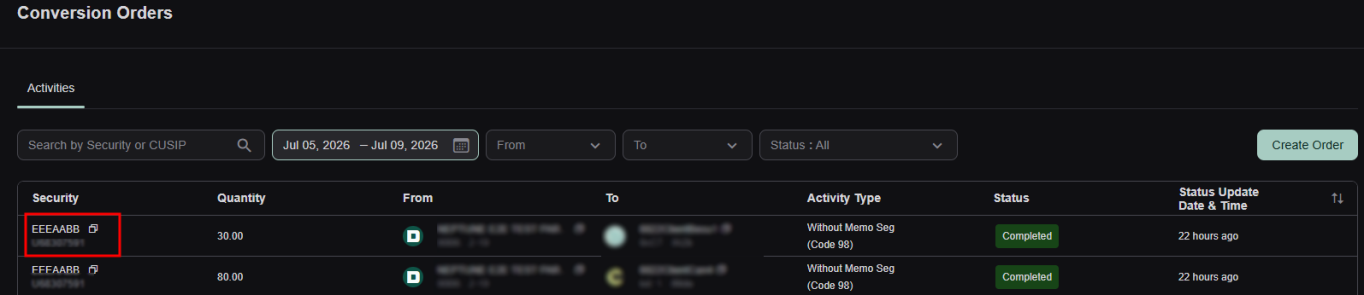
- Click Create Order in the upper right of the Conversion Orders screen.

- Complete the following fields on the Conversion Order form.
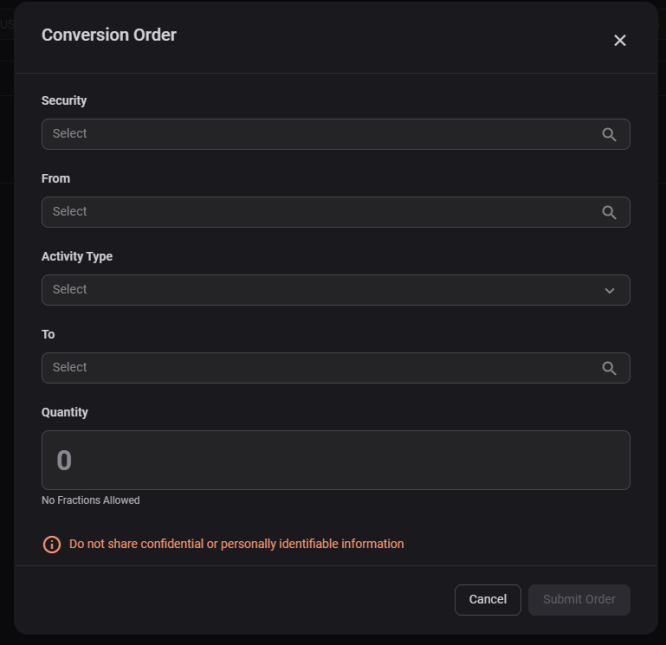
- Enter Security: Select the desired security from the dropdown or type the name of the security to filter the results.
- From: Select the originating wallet from the dropdown for the Conversion Order.
Important
- You can tokenize (mint) or detokenize (burn) securities. In other words, the From field can be a Classic account converting to a Digital account (internal or client), or vice versa, with the From field being a Digital account converting to a Classic account.
- If the desired wallet is not available from the dropdown, that means it has not been registered with the service. Follow the instructions in the Register Wallets topic.
- Activity Type: Select one of the following options from the dropdown:
- With Memo Seg (code 40)
- Without Memo Seg (code 98)
About Memo Segregation
Participants can protect fully paid customer securities using the Memo Segregation function. Memo Segregation is similar to the Segregation function, which allows a Participant to protect fully paid customer securities by moving them from a free position to a protected (segregated) position. However, whereas Segregation allows a Participant to move only existing positions, Memo Segregation allows the Participant to create memo-segregated positions within its free positions, thereby allowing the Participant to protect anticipated fully paid customer securities.
A Participant can activate any of the below Memo Segregation indicators by providing DTC with a standing Memo Segregation instruction. When the Participant activates a Memo Segregation indicator, the Participant’s free position and Memo Segregation position are automatically updated according to the indicators that the Participant has elected.
- Select With Memo Seg (code 40) to automatically increase the Participant’s Memo Segregation counter upon the receipt of free and valued DOs (Delivery Orders)
- Select Without Memo Seg (code 98) to always reduce a Participant’s Memo Segregation position
- To: Select the receiving wallet from the dropdown. Note: The same principles described for the From field apply here: the To field can be either a Digital account converting to a Classic account (Internal or Client), or a Classic account converting to a Digital account.
- Quantity: Enter the number of tokens or shares you want to convert. The quantity of tokens, or shares, associated with the transaction. Note: each token represents a share and the platform does not allow fractional tokens.
- Click Submit Order.
Once the Conversion Order has been submitted, it appears on the Conversion Orders screen with a status of Processing. (Note: Order completion is dependent on blockchain volume and confirmation timing.)
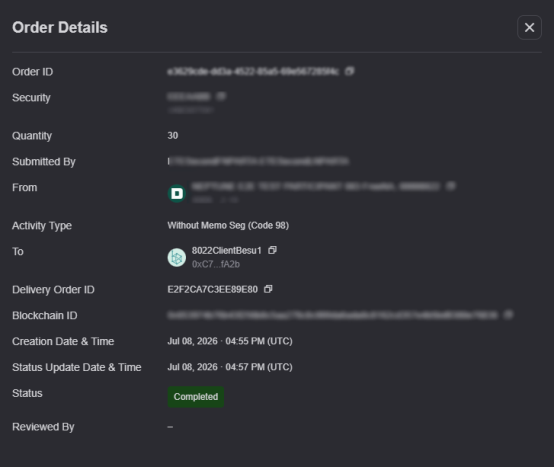
To view the conversion's Order Details, click the associated CUSIP.
|
|
|