DTCC Tokenization Service: Conversion Order Screen
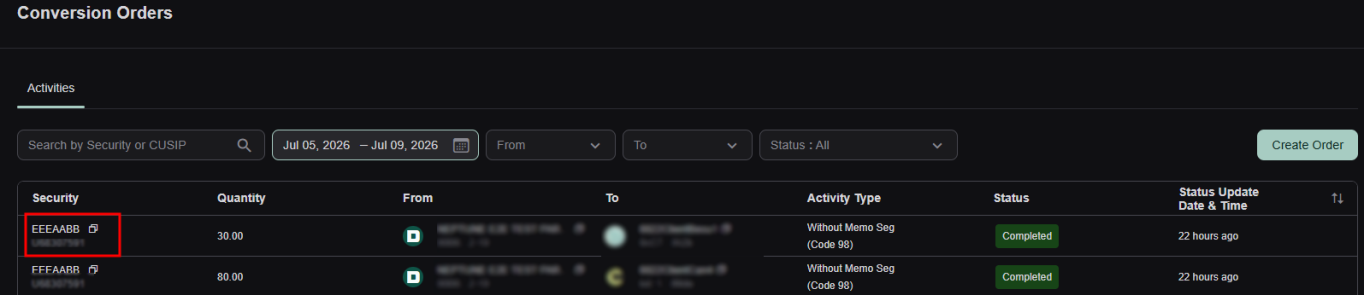
The Conversion Orders screen lists all of the conversion orders associated with your account, along with their details. You can also create new conversion orders using the Create Order button. (See Create Conversion Order for instructions on creating a conversion from the DTCC Classic account to a tokenized digital wallet or vice versa.)
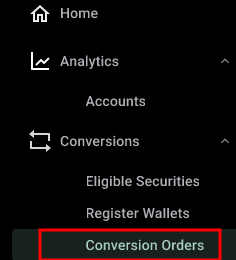
This screen is accessible from the Conversions section of the left-hand navigation.
|
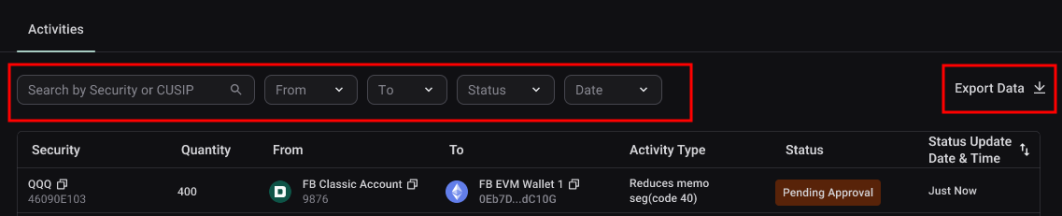
Use the search bar to filter the displayed conversion orders. You can also export the data to a .csv file for analysis.
|
The following table describes the key columns displayed in the Conversion Order screen:
| Field | Description |
|---|---|
| Security | The security name and its associated CUSIP. |
| Quantity | The quantity of tokens, or shares, associated with the transaction. Note: each token represents a share and the platform does not allow fractional tokens. |
| From | The originating account on the conversion order and its associated wallet address. Note: For conversion orders where a security is being tokenized for the first time, the originating account will be from the classic account. This field is denoted by the ledger’s associated blockchain icon.
|
| To | The receiving account on the conversion order. |
| Activity Type | Denotes whether the Conversion Order is processed With Memo Seg (Code 40) or Without Memo Seg (Code 98). For more information about these activity types, see About Memo Segregation. |
| Status |
The Conversion Order status indicates the current state of an order within the workflow. The following statuses are possible:
|
| Status Update Date & Time | The timestamp for the most recent activity Status Update. |
 icon refers to the
 icon refers to
 icon refers to DTCC's offchain ledger that is tied to the participant's DTC account.
To view the conversion's Order Details, click the associated CUSIP.
|
|
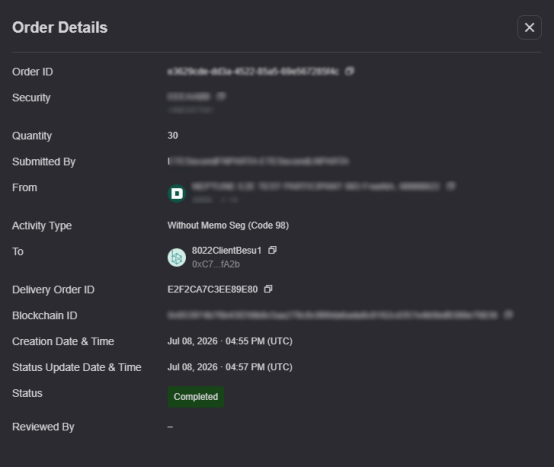
The Order Details screen displays on the right.
|