Confirm/Affirm Details Page in NearMatch - Overview
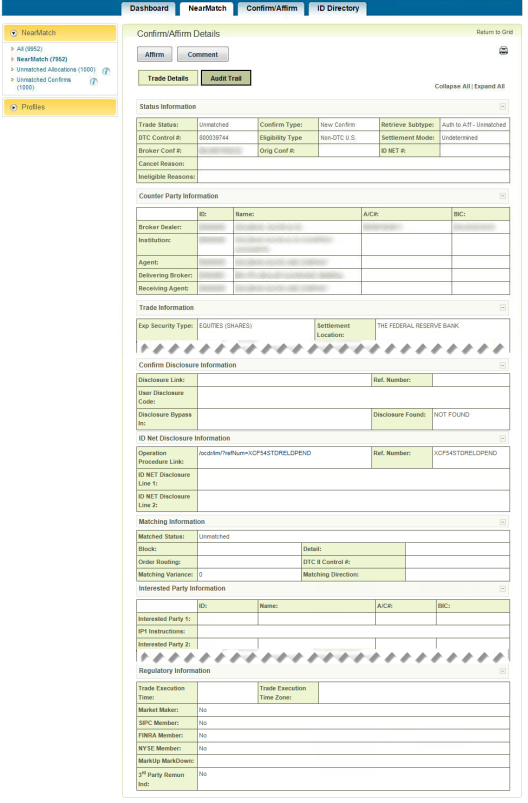
The Confirm/Affirm Details page in NearMatch displays all details for a selected confirm.
Confirm/Affirm Details
|
Authorized users can affirm or enter comments for the confirm displayed on the Confirm/Affirm Details page. You can also:
- Hide all of the fields by clicking Collapse All.
- View all of the fields on the page by clicking Expand All.
- View the fields for a specific category by clicking the plus sign (+) to the right of the category name.
- Hide the fields for a specific category by clicking the minus sign (-) to the right of the category name.
The next table shows the five possible tabs and the categories of data available on each tab. Click a tab to view the fields for that category. To return to the same location that called the Confirm/Affirm Details page, click Return to Grid. For more information about each field within the Confirm/Affirm Details page, see the All Confirm/Affirm fields topic in the Confirm/Affirm Reference: Investment Managers guide.
Confirm/Affirm Details Page Tabs
| Trade Details |
Default tab. All of the following sections are fully expanded when you first open this page:
- Status Information
- Counter Party Information
- Trade Information
- Confirm Disclosure Information
- Matching Information
- Interested Party Information
- Regulatory Information
|
| Fixed Income |
Available only if the trade has any of the following details:
- Fixed Income data (Municipal Securities)
- Repo data (FIN or COL security type)
- MBS data (Mortgage Backed Securities)
All sections are available and fully expanded unless collapsed by the user. The sections are:
- Status Information
- Fixed Income/MSRB Information
- Finance/Repo Information
- MSRB Information
- MBS Specifications Information
|
| Cross Border |
Available based on the following rules:
- It is available when the trade is not settled in the United States. That is, the Settlement Location is not: "DTC", "US", "FED", "BRC", or "PTC".
- It is available when the trade is settled in the United States and the trade contains a value for Agent Sub Custodian ID or Broker Sub Custodian ID.
All sections are available and fully expanded unless collapsed by the user. The sections are:
- Status Information
- Cross Border Details Information
- Other Amounts Information
|
| AOCC |
Available only if an advice of cancellation or correction (AOCC) exists for the displayed confirm. This tab displays information for the most recently entered AOCC.
|
| Audit Trail |
Available for all trades. All of the following sections are fully expanded when you first open this tab:- Status Information
- Audit Trail/History Information
|
