TradeSuite ID BTI Export Profile Page Overview
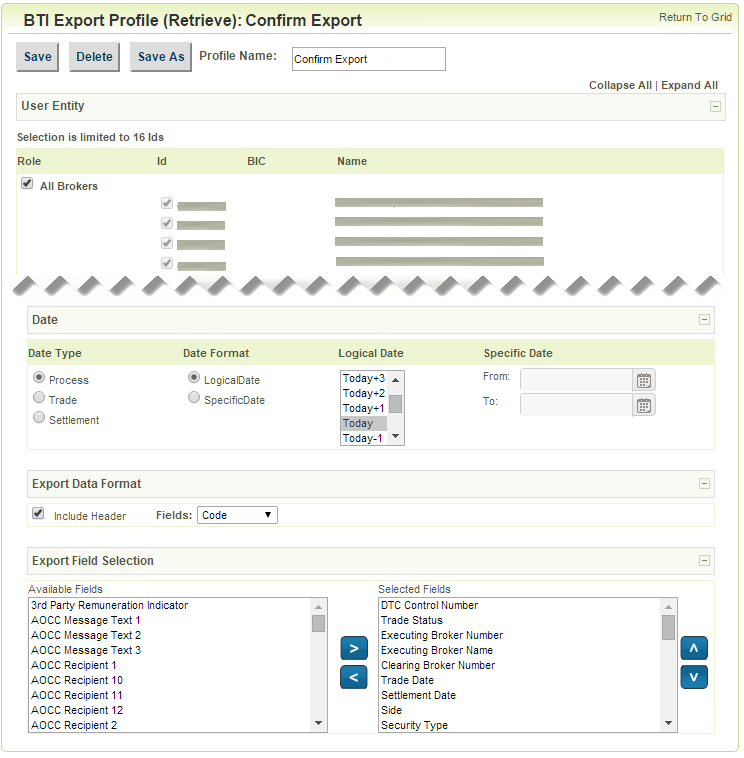
The BTI Export Profile page displays the lists of Available and Selected export fields. You can move the fields from one list to the other to define the fields to export. In the Selected Fields list, use the up and down arrows to arrange the order of the fields.
BTI contains two predefined export profiles called Confirm Export and Allocation Export. Use these predefined profiles as is or as a template to create a new export profile that you can modify for immediate or future use.
In the BTI Export Profile, add up to a total of six user-defined BTI export profiles by updating the user entity, date, export data format, and export fields. For example, you can create four confirm export profiles and two allocation export profiles. If you attempt to add more than six user-defined export profiles, you receive an error message.
Click the icons to expand, collapse, and print the content on this page.
- From the Profiles menu, click Export Profiles.
The default export profile,
- The following options are available:
- Modify the
- Click a previously created user-defined export profile from the left menu.
- Select the Allocation Export profile to create a user-defined profile based on this profile.
The next figure shows the BTI Export Profile page.
BTI Export Profile: Confirm Export