
Automatically Create Confirms
The UI allows USDI executing brokers to instruct CTM to create a USDI or USDM (US (Depository Interface External Affirmation) confirm with its TradeSuite ID on its behalf that settles at either DTC or Fedwire.
| Note |
| Also, note that the create confirm feature is also available in the Copy function but not Amend. |
As with other fields in manual entry, to take advantage of the Create Confirm feature, first click the + Add a Field link in the lower left section of the Create an Allocation dialog box to add it as an option.
The figure below shows an example of the Create an Allocation dialog box with the Create Confirm radio buttons.
|
|
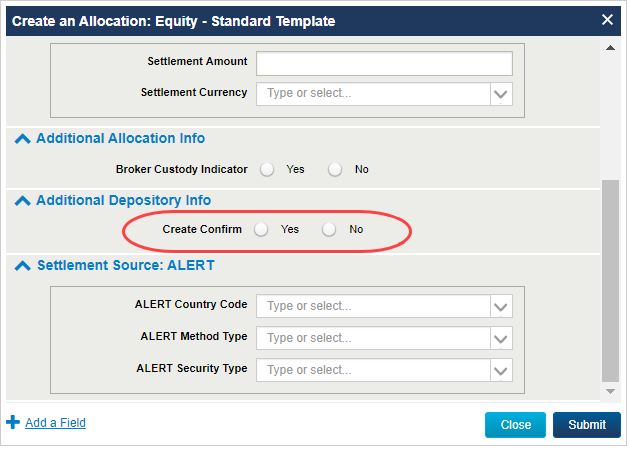
The valid values for the Create Confirm radio buttons are as follows:
- Yes—CTM automatically creates and submits a TradeSuite ID confirm on your behalf.
- No—CTM does not create and submit a TradeSuite ID confirm on your behalf.