
Reject a Counterparty Request to Cancel
When you reject a counterparty request to cancel, your counterparty cannot submit another cancel request for the trade.
To reject a cancel request:
- Use one of the following methods to open the Trade Side Details for the MAGR trade with the CCRQ (Counterparty Cancel Requested) status:
- Locate the trade in the All Exceptions view.
- Use one of the Search functions to find the MAGR trade.
- Select the block or any of the allocations in the trade that you want to cancel.
- Click Reject Cancel.
The Reject Cancel screen appears (see below).
|
|
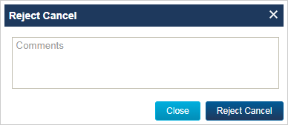
- Type a comment in the Comments box of the Reject Cancel screen and then click Reject Cancel.
The UI displays a pop-up in the lower right corner of your screen to confirm that your action was successful. The Block Status and Allocation Status transition to CREJ (Cancel Rejected).