
TradeSuite Broker Reversal CNS to PDQ (IDPB)
The IDPB function allows Reversal of Affirmation Status for CNS.
To access the IDPB function, log into PBS. select Omgeo Services from the menu, then select IDPB under Trade Input.
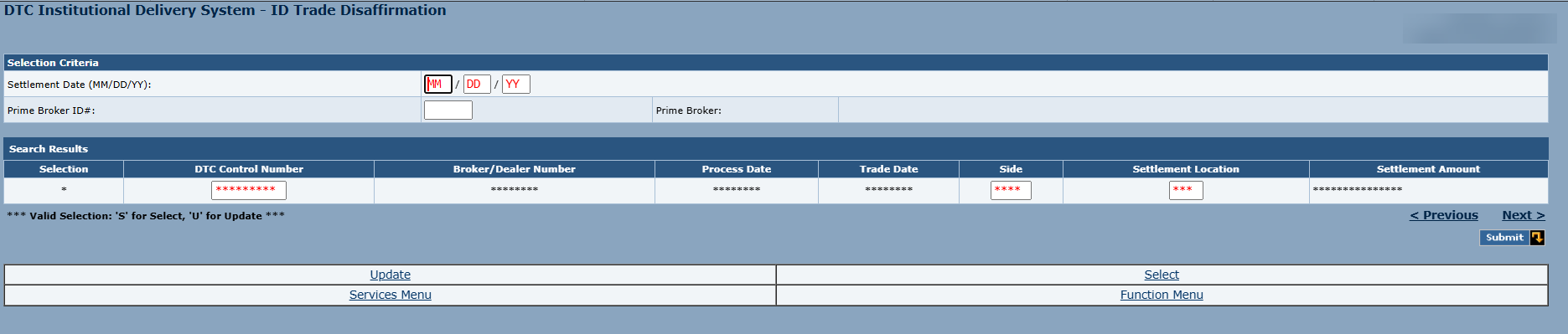
Prime brokers have the option under certain circumstances, to disaffirm an affirmed confirmation back to unaffirmed status. Only prime brokers have access to the IDPB disaffirmation function in the TradeSuite ID service through PBS terminals. When disaffirmation becomes necessary, the prime broker can use the IDPB function to enter the individual DTC control number of those trades to be disaffirmed.
|
Field |
Length |
Format |
M/O |
Vali- |
Field Description |
|---|---|---|---|---|---|
| Settlement Date | 6 | Numeric 9(6) | M | Y |
Date, in MM/DD/YY format, when the trade is due to settle. The settlement date is greater than or equal to the trade date. For When-Issued or When- Distributed trades, the value can be zero |
|
Prime Broker ID |
5 |
Numeric 9(5) |
M |
Y |
|
| DTC Control Number | 9 | Numeric 9(9) | M | Y | Number assigned by the TradeSuite ID® service to a broker/dealer’s trade. |
When the details appear:
- Type S to see more Details.
- Type U and Update to Disaffirm.
- Click Verify Disaffirm to verify trades.