
100–Request Status
When the receiver submits a standard or full transfer, the transfer begins in the 100–Request status. A new transfer stays in the 100–Request status for one business day.
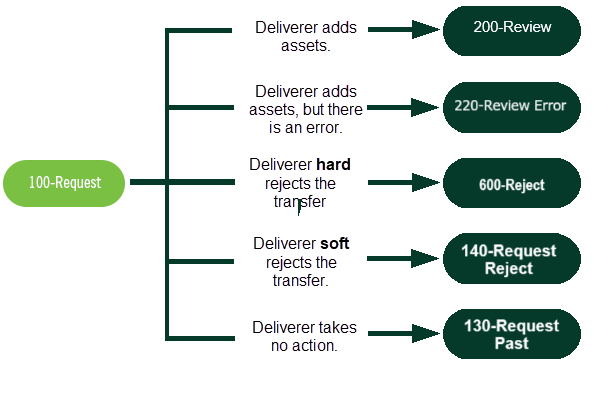
Depending on the deliverer’s action, the transfer takes one of five paths. The following figure shows the process for a 100–Request status.
|
During the 100–Request status, the delivering firm can validate or reject the transfer by adding assets. The deliverer validates a transfer by submitting a detailed list of the account's assets to ACATS, using the asset transfer (AT) input records. By submitting the asset records, the deliverer acknowledges the transfer and moves the account from the 100–Request status to the 200–Review status.
Alternatively, the deliverer rejects the transfer request. Certain rejects—such as invalid account number, additional documentation, social security number mismatch, account title mismatch, or account flat—cause the transfer request to pend for one day to give the receiver time to correct the transfer input request information. This is known as a soft reject or the 140–Request Reject status. All other transfer input rejects are hard rejects. That is, the transfer goes to the 600–Reject status, and it is purged from the ACATS system.
If the delivering firm takes no action while the transfer is in the 100–Request status, the transfer goes to the 130–Request Past status.
| Note |
|
During the 100-Request status, if a receiving firm makes a TI change prior to the deliverer submitting assets, the request remains in 100-Request status. However, if the deliverer submits the assets in the same cycle that the TI change occurs, ACATS rejects the TI change for anything other than a Comments change. |