
My Files
The My Files feature provides a secure location in MyDTCC, where you can access reference materials, download software, and exchange documents with DTCC.
To open My Files, select My Files from the navigation menu at the top of the MyDTCC Home Page.
The options displayed on the My Files page depend on your client type and account access. They may include:
- Reference Materials
- My Folders & Documents
- Project Folders
- Software Installs
Reference Materials
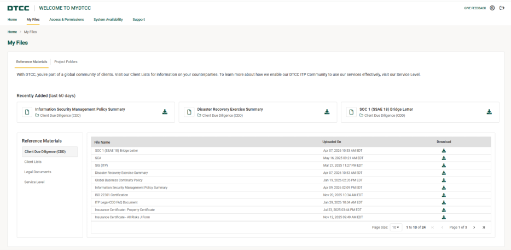
The Reference Materials section is available to all MyDTCC users and provides a convenient location for self-service documents, guidance, and resources.
Within Reference Materials, you can:
- Browse available folders and documents
- View recently added content
-
Download files as needed
Your Secure Document Folders
Depending on your account access, you may also see secure folders assigned by a DTCC team. These may include:
- My Folders & Documents: Securely exchange documents with DTCC
- Supported file types include .doc, .docx, .jpg, .msg, .pdf, .png, .txt, .xls, .xlsx, .log, .csv, and .zip.
- The maximum file size is 1 GB.
- Folder owners can share access with other users at the same firm.
- Project Folders: Securely access and share project-related documents from DTCC.
- Supported file types include .doc, .docx, .jpg, .msg, .pdf, .png, .txt, .xls, .xlsx, .log, .csv, and .zip.
- The maximum file size is 1 GB.
- Software Installs: Securely access software and related files.