
Manage Preferences
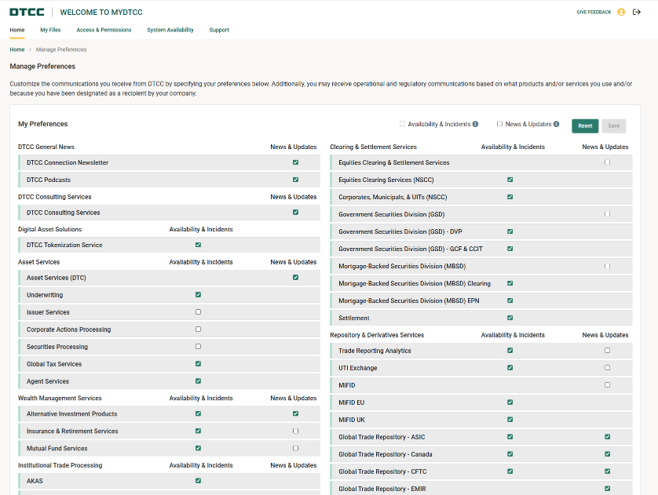
The Manage Preferences feature allows you to manage your communication subscriptions and customize the views on your System Availability dashboard. You can use this feature to choose the products and services you receive communications for and the types of communications you receive. Two subscription types are available:
- News & Updates for marketing communications
- Availability & Incidents for outage communications
You can access this feature in one of two ways:
- Select the user profile icon in the upper-right corner of the page, and then select Preferences from the drop-down menu.
- Select System Availability from the navigation menu at the top of the MyDTCC home page, and then select Manage Preferences in the System Availability table.
Subscribe to Communications
Locate the product or service you would like to receive communications for. Select the checkbox for News & Updates, Availability & Incidents, or both, and then select Save in the upper-right corner.
There is no limit to the number of subscriptions you can have.
Unsubscribe to Communications
Locate the product or service you would like to stop receiving communications for. Clear the applicable checkbox, and then select Save in the upper-right corner.
Reset Your Changes
Select Reset to discard any unsaved changes and return to your previously saved preferences.
Important: Updates may take some time to process. Your changes may not be immediately reflected in the MyDTCC Portal or in the communications you receive.
|